
How to make your resume ATS friendly: I tested 6 formats in 4 ATSs
An ATS-friendly resume is one the hiring software can read correctly. I took one resume, saved it in six different layouts, and uploaded each one to four of the systems companies use to collect applications: Lever, Workday, Ashby and SmartRecruiters. The plain one-column versions worked in all four. Three of the fancier layouts each broke one system.
Lincoln Laylor7 min read
TL;DR
Do
- Use one column that reads top to bottom
- Type your name and contact details at the top of the page
- Use plain headings: Summary, Experience, Education, Skills
- Save it as a PDF or Word file from Word or Google Docs
- Check the form after it fills itself in
Don’t
- Send a resume that is a picture or a scan
- Use a two-column or sidebar design
- Lay it out with a table
I build Cover Me, a Chrome extension that tailors resumes to job postings. I ran this test because most resume formatting advice gets repeated from article to article without anyone checking it.
What is an ATS?
An ATS, or applicant tracking system, is the software a company uses to collect job applications. When you upload your resume, it copies the text out of your file and sorts it into boxes: your name, email, past jobs, education and skills. Recruiters then search those boxes for the skills they need. If your layout confuses the software, the boxes come out empty or wrong. My guide to ATS scores explains how that screening works in more detail.
A badly read resume usually isn’t thrown out automatically. In a 2025 Enhancv study, 23 of 25 US recruiters said their system doesn’t auto-reject resumes for their format. The popular claim that 75% of resumes get rejected by an ATS has no published study behind it. The real cost is quieter. Your application shows up with missing or wrong details, and a recruiter’s search can miss skills the software never read.
How I tested it
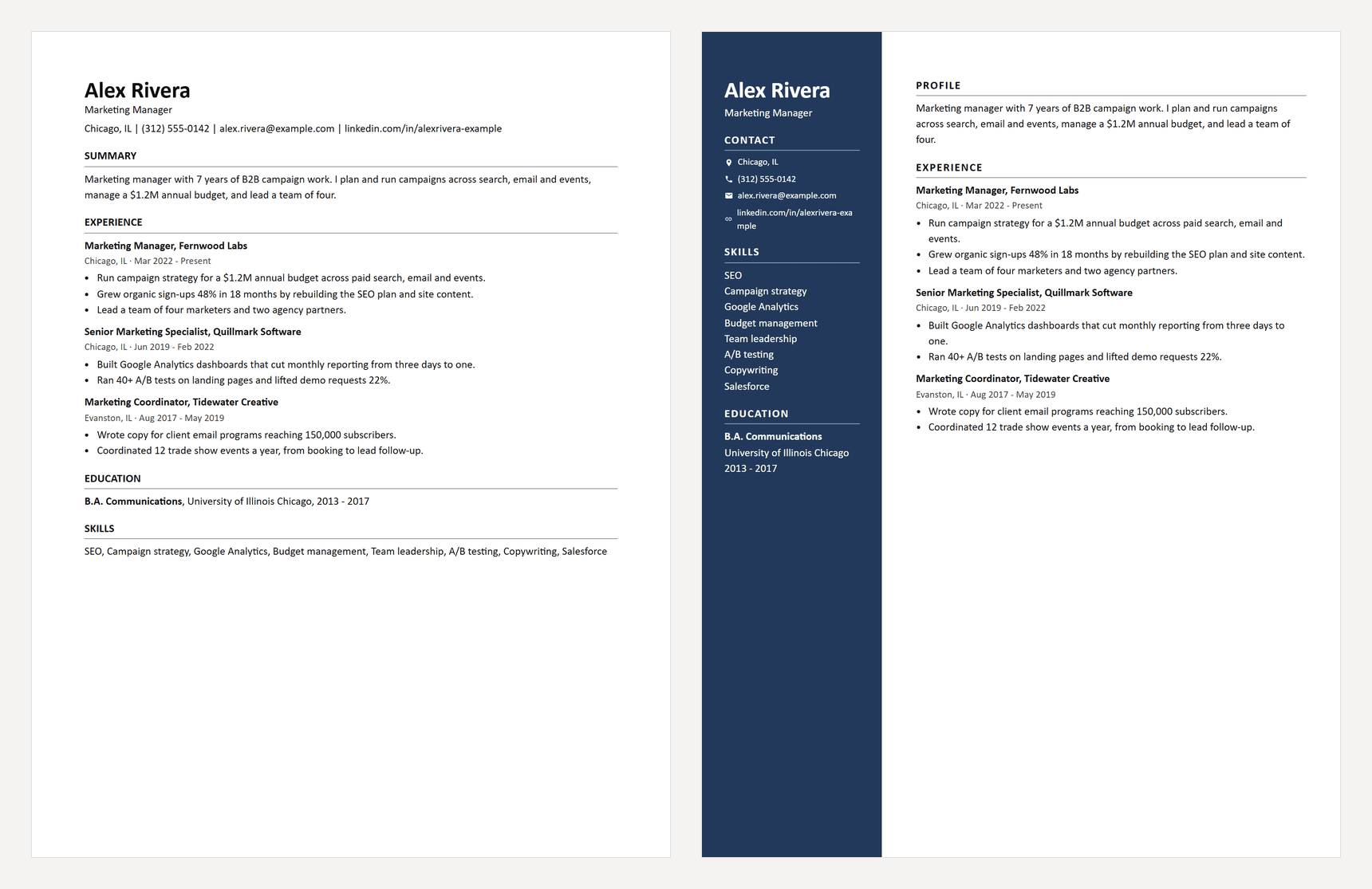
I wrote a resume for a made-up marketing manager, Alex Rivera, and saved the same words six ways:
- A plain one-column PDF
- The same thing as a Word file
- A two-column design with a colored sidebar, like many resume templates
- A Word file with the name and contact details in the page header
- A Word file laid out with a table
- A PDF that is just a picture of the resume, like a scan
Many job applications have an “autofill from resume” button that reads your file and fills in the form for you. That shows exactly what the system pulled out of your resume. I used it on live job postings at each of the four systems, started from an empty form every time, wrote down what filled in, and never submitted an application.
Where I tested: Lever on the careers page of Employ, the company that owns Lever. Ashby on Ashby’s own careers page. SmartRecruiters on a Bosch job posting. Workday on NVIDIA’s careers site, where I signed in and started a new application for each file.
The results
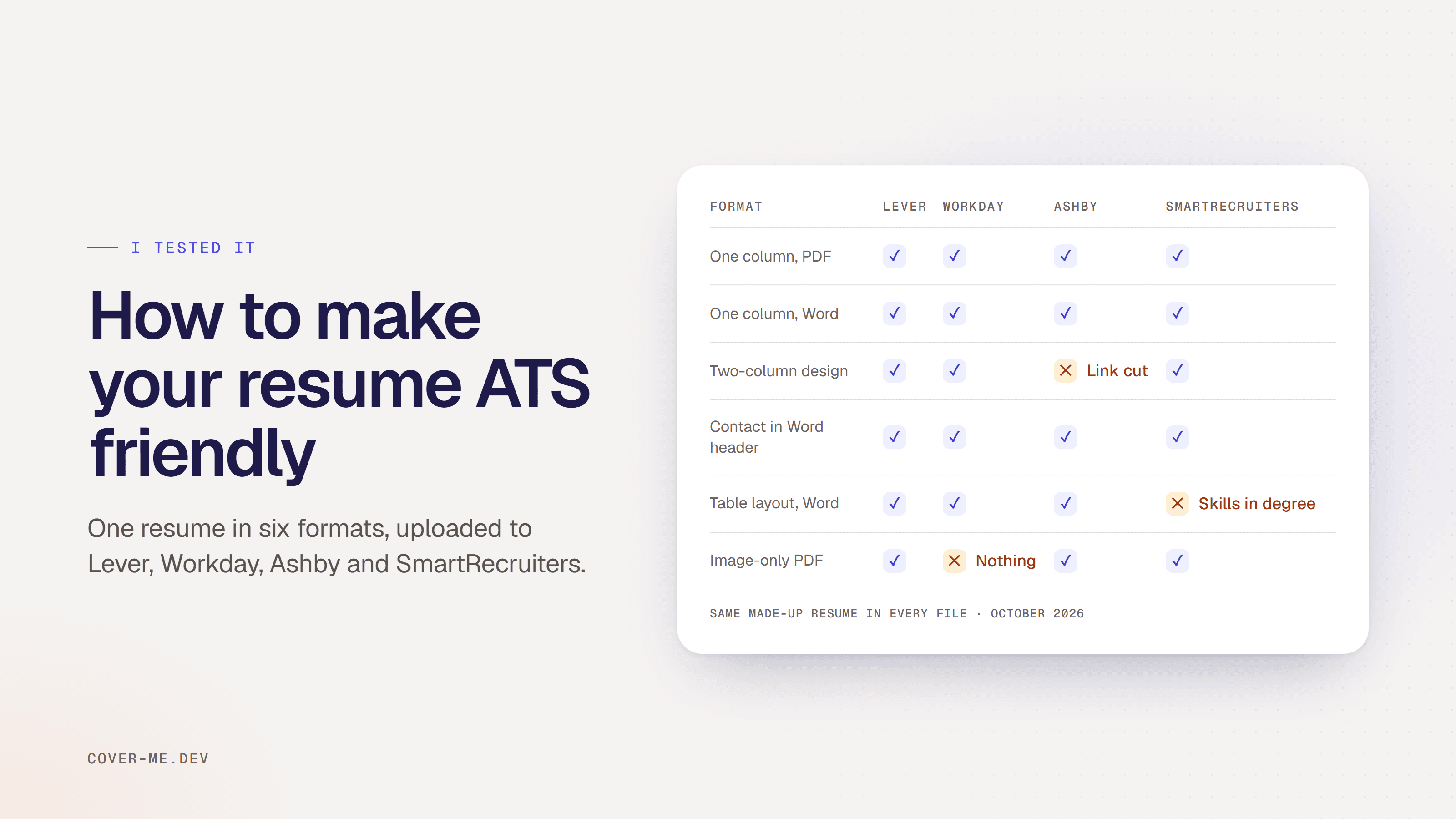
| Resume layout | Lever | Workday | Ashby | SmartRecruiters |
|---|---|---|---|---|
| One column, PDF | ||||
| One column, Word | ||||
| Two columns | Cut off the LinkedIn link | |||
| Name and contact in the Word header | ||||
| Built with a table | Put skills in the degree | |||
| Saved as an image | Read nothing |
A check means the system filled in the form correctly from that file. Tested October 31, 2026. Click a layout to download the test file.
The plain one-column PDF and Word file worked everywhere. So did putting your name in the Word header, which a lot of advice says to avoid. The other three layouts each broke one system.
3 resume layouts that broke a real ATS
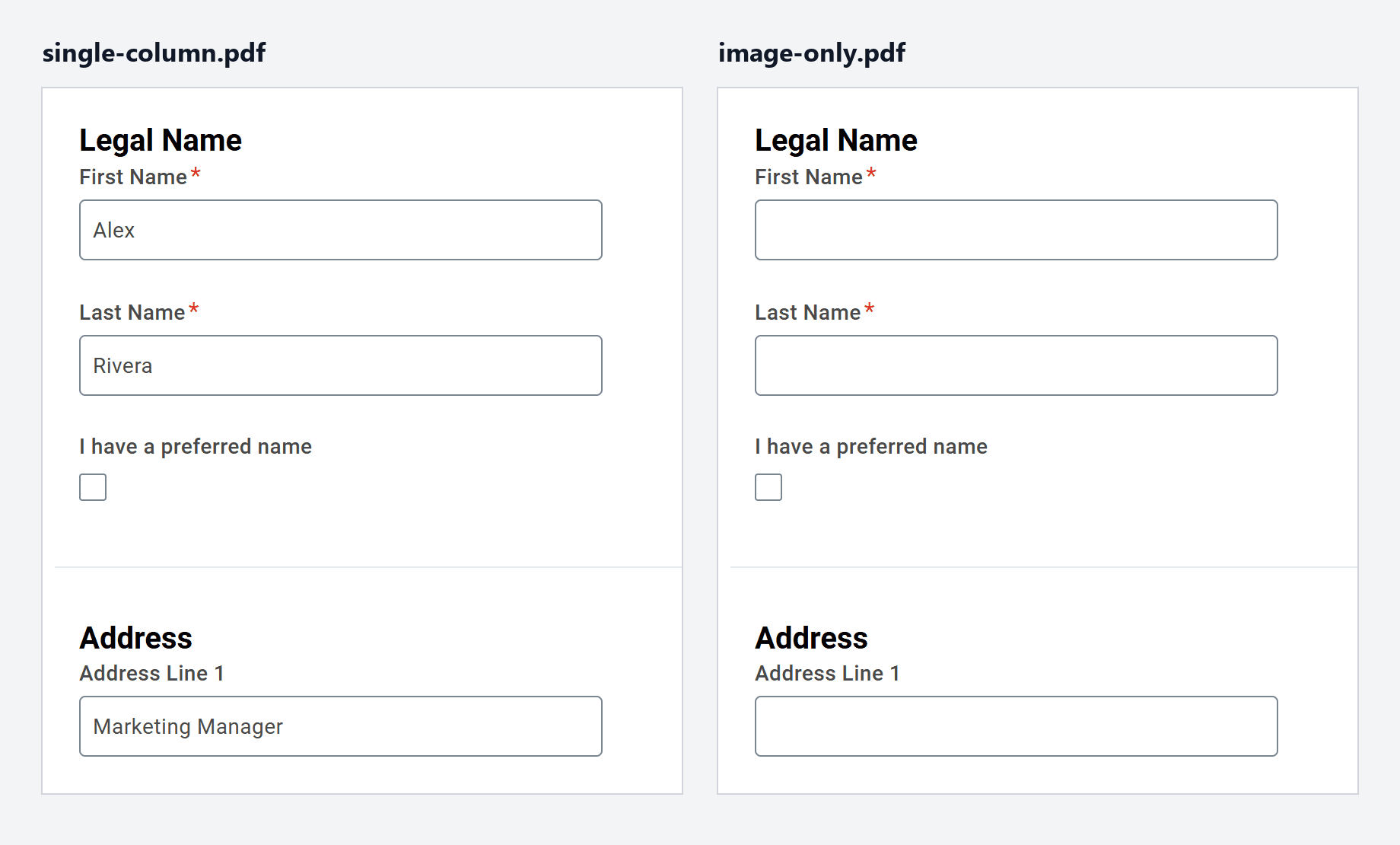
1. A resume saved as a picture
Some resumes are exported from a design app as an image, or scanned. There’s no real text in the file, only a picture of text. Lever, Ashby and SmartRecruiters could read the picture anyway. Workday couldn’t, and left every box empty.
Quick test: open your PDF and try to highlight a single word. If you can’t, your resume is a picture.
2. A two-column layout
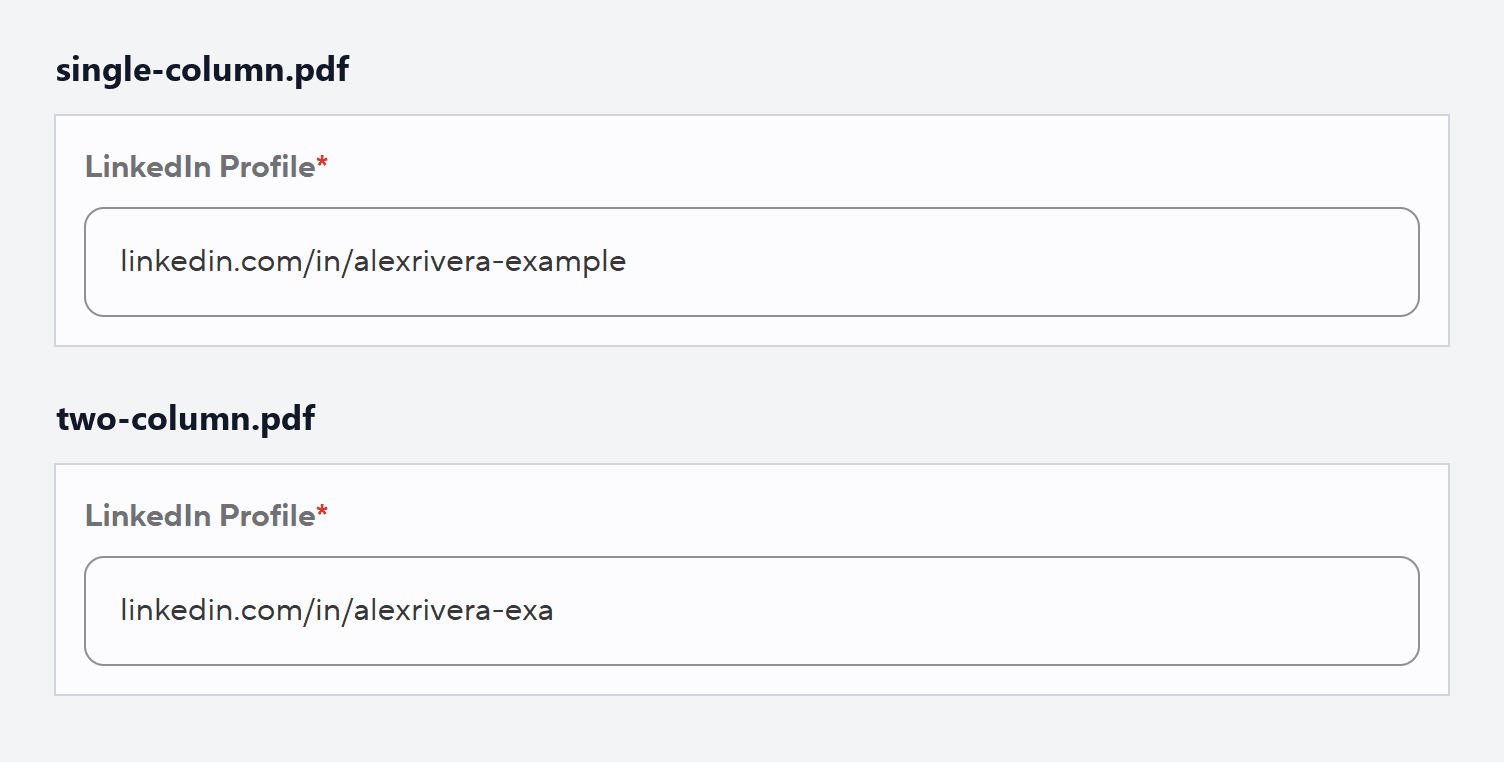
The sidebar is narrow, so the LinkedIn link wrapped onto a second line. Ashby only kept the first line and filled in “linkedin.com/in/alexrivera-exa”. A recruiter who clicks that gets a broken page. The other three systems read the two-column design correctly.
3. A layout built with a table
Some Word templates use a table to line up the sections. In mine, education and skills sat in boxes next to each other. SmartRecruiters filled in the degree as “B.A. Communications A/B testing, Copywriting”, with two skills stuck on the end. The other three systems were fine.
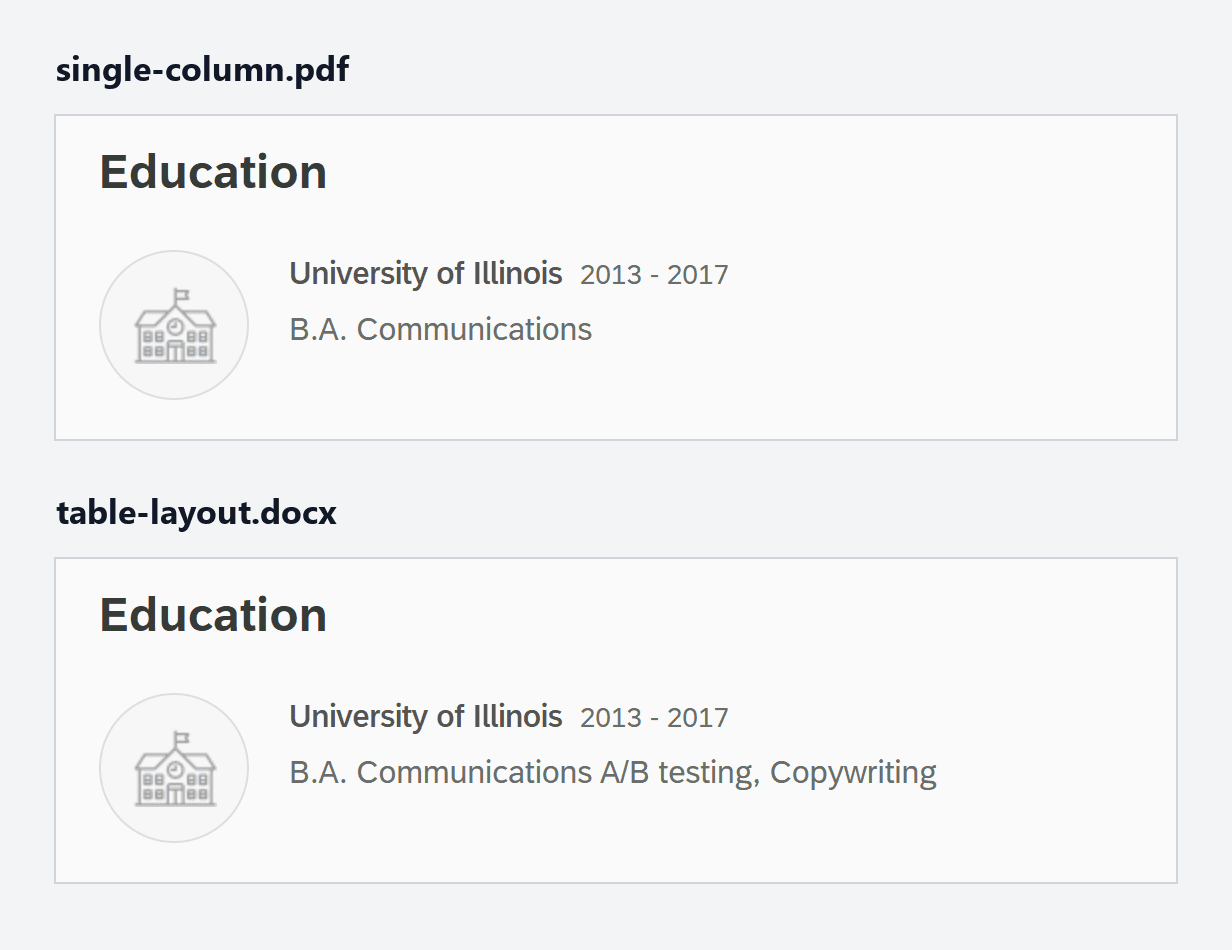
Even a plain resume gets misread
Lever and Ashby read the plain one-column file perfectly. Workday and SmartRecruiters still made mistakes with it:
- Workday left the company name blank on the most recent job.
- Workday put the job title “Marketing Manager” in the street address box.
- SmartRecruiters shortened “University of Illinois Chicago” to “University of Illinois”.
- SmartRecruiters never filled in the LinkedIn box.
No layout change fixes these. When a form fills itself in from your resume, read every box before you submit.
ATS-friendly resume checklist
- Use one column. Everything in a single column that reads top to bottom. My two-column sidebar wrapped the LinkedIn link onto two lines, and Ashby kept only the first one.
- Make sure the text is real text. Save from Word or Google Docs, not as a picture from a design app or a scan. Workday filled in nothing from my image version. If you can't highlight a word in your PDF, it's a picture.
- Don't use tables to line things up. Use plain paragraphs and bullet points. SmartRecruiters mixed two of my skills into my degree from the table version.
- Put your name and contact details on the page. Type them as the first lines, not in Word's header area. All four systems found them in the header, but simpler ones don't.
- Use standard section headings. Summary, Experience, Education and Skills. Skip spaced-out or decorative headings.
- Send a PDF or a Word file. Both worked. Follow the job posting if it asks for one.
- Check what the form filled in. Workday and SmartRecruiters got details wrong even from the plain file. Fix them by hand before you submit.
- Then match the job posting. A clean format only gets your words read. Recruiters search those words for the skills in the posting, so use its wording where it's true for you.
For the last step, see my guides on tailoring your resume to a job description and what an ATS score measures.
How to check your own resume
- Open your resume PDF and select all the text.
- Paste it into Notepad (Windows) or TextEdit (Mac).
- Check that your name, contact details, job titles and skills all came through, in order. If nothing would highlight, your resume is a picture.
You can also upload it to any job application with an “autofill from resume” button, see what fills in, and leave without submitting.
What do simpler systems lose?
To see what a more basic system would get, I also ran every file through three free tools that pull text out of documents: Apache Tika, pdftotext for PDFs, and a Word reader that only reads the main body of the page. They lost a lot more:
- Word header. The basic Word reader started at “Summary”. Alex’s name, email, phone and LinkedIn were gone.
- Table. The basic Word reader got no text at all, because every word sat inside a table.
- Picture PDF. Tika and pdftotext both got no text.
- Two columns. Tika and pdftotext both split the LinkedIn link in the same place Ashby cut it, and pdftotext read the spaced-out headings as separate letters.
Alex Rivera
Marketing Manager
C O N TA C T
Chicago, IL (312) 555-0142 alex.rivera@example.com linkedin.com/in/alexrivera-exa mple
SKILLS
SEO Campaign strategy Google Analytics Budget management ...
What pdftotext got from the two-column design.
Frequently asked questions
Is a PDF or a Word document better for an ATS?
Both worked in my test. Lever, Workday, Ashby and SmartRecruiters filled in the same details from the one-column PDF and the one-column Word file. The layout inside the file matters more than the file type. Send whichever one the job posting asks for.
Will a two-column resume get rejected by an ATS?
Probably not rejected, but it can be misread. Three of the four systems read my two-column resume correctly. Ashby cut my LinkedIn link short, because the narrow sidebar had wrapped it onto a second line, so a recruiter clicking it would get a broken page. A one-column layout avoids that.
Does an ATS automatically reject resumes?
Rarely for formatting. In a 2025 Enhancv study, 23 of 25 US recruiters said their system doesn't auto-reject resumes for formatting, content or design. The other 2 set it to reject candidates below a match or experience threshold. Recruiters can also add knockout questions to the form, such as work authorization, that reject an application automatically. The often-quoted claim that 75% of resumes are rejected by ATS has no published study behind it.
How can I check if my resume is ATS friendly?
Open your PDF, select all the text, and paste it into a plain text editor such as Notepad. If your name, contact details, job titles and skills come out complete and in order, an ATS can read them. If you can't select any text, your resume is an image. You can also upload it to a job application that has an "autofill from resume" button, check what fills in, and leave without submitting.
Format fixed? Tailor the words next
Cover Me tailors your resume to the job posting you have open, shows its ATS keyword score, and writes the cover letter. Free to start.
Using a Word file? See how to tailor it without losing its formatting.